 BornAgain
≻ git-develop
≻ Documentation ≻ Reference ≻ Sample model ≻ Particles ≻ Composite particles ≻ Compound particle
BornAgain
≻ git-develop
≻ Documentation ≻ Reference ≻ Sample model ≻ Particles ≻ Composite particles ≻ Compound particle
BornAgain
≻ git-develop
≻ Documentation ≻ Reference ≻ Sample model ≻ Particles ≻ Composite particles ≻ Compound particle
BornAgain
≻ git-develop
≻ Documentation ≻ Reference ≻ Sample model ≻ Particles ≻ Composite particles ≻ Compound particle
This tutorial demonstrates how to construct complex shape particles.
All particles implemented in BornAgain are defined by their form factors,
their sizes and the materials they are made of. The form factor library
provides access to elementary shapes. A Compound object composes simple
particles and other composite particles into one coherent particle object:
it can be rotated, translated and used wherever an IParticle is accepted.
The scattering from such a particle accounts for coherent interference between sub-particles.
Create an empty composition with
composition = ba.Compound()
Particle placement inside the composition is controlled by the positions
passed to addComponent or addComponents:
composition.addComponent(particle)               # at origin
composition.addComponent(particle, ba.R3(0, 0, 0))
composition.addComponents(particle, [pos1, pos2])
The existing composition can be composed to the new one:
composition.addComponent(particle, pos1)
composition.addComponent(compound, pos2)
composition.addComponent(coreshell, pos3)
composition.addComponent(mesocrystal, pos4)
In the following plot we demonstrate the creation of three different compositions.
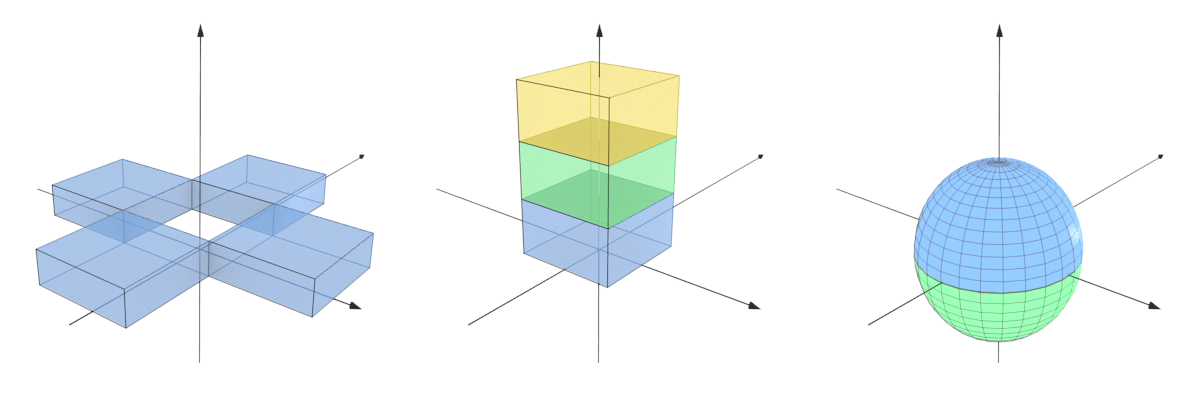
The hollow cross-shape on the left is constructed by adding four copies of the same box-shaped particle at different positions:
length, width, height = 10*nm, 10*nm, 3*nm
box = ba.Particle(box_material, ba.Box(length, width, height))

positions = [
    ba.R3(length, 0, 0),
    ba.R3(0, -width, 0),
    ba.R3(-length, 0, 0),
    ba.R3(0, width, 0),
]
composition = ba.Compound()
composition.addComponents(box, positions)
The stack of boxes at the center is constructed by placing three boxes made of different materials on top of each other:
length, width, height = 10*nm, 10*nm, 5*nm
ff_box = ba.Box(length, width, height)

composition = ba.Compound()
composition.addComponent(ba.Particle(material1, ff_box), ba.R3(0, 0, 0))
composition.addComponent(ba.Particle(material2, ff_box), ba.R3(0, 0, height))
composition.addComponent(
    ba.Particle(material3, ff_box), ba.R3(0, 0, 2*height)
)
The full sphere on the right is composed of two spherical segments, each made of a different material. The bottom half is rotated first by 180 degrees about the Y axis before adding it to the composition.
radius = 16*nm
top_half = ba.Particle(material1, ba.SphericalSegment(radius, 0, radius))
bottom_half = ba.Particle(material2, ba.SphericalSegment(radius, 0, radius))
bottom_half.rotate(ba.RotationY(180*deg))

composition = ba.Compound()
composition.addComponent(top_half)
composition.addComponent(bottom_half)