Running a script

To get started with BornAgain scripting, run a first example.

The commands using python below assume that BornAgain is installed in the active environment and import bornagain succeeds.

This and other scripts are available in the example catalog.

Download the following example script, using the link just below the code frame. Save the script under the name AlternatingLayers.py.

 1
 2
 3
 4
 5
 6
 7
 8
 9
10
11
12
13
14
15
16
17
18
19
20
21
22
23
24
25
26
27
28
29
30
31
32
33
34
35
36
37
38
39
40
41
42
43
44
45
46
47
48
49
50
51
52
53
54
55
56
57
58
59
#!/usr/bin/env python3
# /// script
# requires-python = ">=3.10"
# dependencies = ["bornagain>=25,<26"]
# ///
"""
Basic example of specular reflectometry simulation.
The sample consists of 20 alternating Ti and Ni layers.
"""
import bornagain as ba
ba.require_versions("bornagain>=25,<26")
from bornagain import deg, angstrom, nm


def get_sample():
    # Materials
    vacuum = ba.Vacuum()
    ti_color = (0.05, 0.62, 0.55)
    ti_mat = ba.SLDMaterial("Ti", ti_color, -1.9493e-06, 0)
    ni_color = (0.93, 0.48, 0.14)
    ni_mat = ba.SLDMaterial("Ni", ni_color, 9.4245e-06, 0)
    si_color = (0.30, 0.62, 0.86)
    si_mat = ba.SLDMaterial("Si", si_color, 2.0704e-06, 0)

    # Layers
    top_layer = ba.Layer(vacuum)
    ti_layer = ba.Layer(ti_mat, 30*angstrom)
    ni_layer = ba.Layer(ni_mat, 70*angstrom)
    substrate = ba.Layer(si_mat)

    # Periodic stack
    n_repetitions = 10
    stack = ba.LayerStack(n_repetitions)
    stack.addLayer(ti_layer)
    stack.addLayer(ni_layer)

    # Sample
    sample = ba.Sample()
    sample.addLayer(top_layer)
    sample.addStack(stack)
    sample.addLayer(substrate)

    return sample


def get_simulation(sample):
    n = 500
    scan = ba.AlphaScan(n, 2*deg/n, 2*deg)
    scan.setWavelength(1.54*angstrom)
    return ba.SpecularSimulation(scan, sample)


if __name__ == '__main__':
    sample = get_sample()
    ba.showSample3D(sample, sample_size=120*nm, seed=0)
    simulation = get_simulation(sample)
    result = simulation.simulate()
    ba.plot_datafield(result)
    ba.plt.show()
auto/Examples/specular/basics/AlternatingLayers.py

For a discussion of the content of this script, see simulation/reflectometry.

From the command line

In a terminal with the BornAgain environment activated, run:

python AlternatingLayers.py

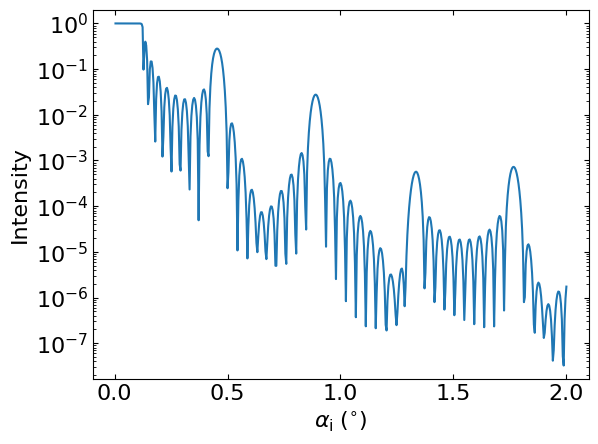
The script opens a 3D sample view and a Matplotlib window showing this reflectometry curve:
On Linux and Windows, you can instead let uv prepare the script’s environment:

uv run AlternatingLayers.py

Short call (Linux and macOS)

With the BornAgain environment activated, make the script executable and run it directly:

chmod a+x AlternatingLayers.py
./AlternatingLayers.py

The first line, #!/usr/bin/env python3, selects python3 from PATH.