A Sample and
LayerStack contain one or several instances
of class Layer.
A Layer instance is created by one of the constructor calls
ba.Layer(material)
ba.Layer(material, roughness)
ba.Layer(material, thickness)
ba.Layer(material, thickness, roughness)
For the first argument, see Material.
The optional thickness argument is the layer thickness in nm. If it is
omitted, then the thickness is set to infinite, and the layer can be used as
top or bottom of a multi-layer sample, or as the sole component of a
single-layer sample.
For the optional roughness argument, see Roughness.
To add particles on a surface or interface, first create a 2D structure:
structure = ba.Dilute2D(density, particle)
Then add it to a layer:
layer.deposit2D(structure)
layer.addDeposit2D(coverage, structure)
layer.suspend2D(structure)
layer.addSuspend2D(coverage, structure)
With deposit2D and addDeposit2D, the bottom of particles is placed at the
layer’s bottom interface. This is appropriate for particles sitting on a
substrate. These methods are only valid for finite-thickness layers.
With suspend2D and addSuspend2D, the top of particles is placed at the
layer’s top interface. This is appropriate for particles hanging from below an
interface, such as holes or inclusions embedded in a substrate.
For argument structure, see Particle assembly. For an
example using suspend2D, see HolesLattice.
For an incoherent mixture of different structures, call addDeposit2D or
addSuspend2D several times, with a coverage argument between 0 and 1. If
coverage is 1, the simpler forms deposit2D or suspend2D can be used.
Soft particles such as FuzzySphere and GaussSphere have diffuse
boundaries. To place their center away from the default anchor plane,
translate the particle before creating the 2D structure:
particle.translate(0, 0, z_shift)
layer.deposit2D(ba.Dilute2D(density, particle))
For an example, see SoftSpheres.
To add particles distributed through a layer volume, create a 3D structure and add it to the layer:
structure = ba.Dilute3D(volume_density, particle)

layer.fill3D(structure)
layer.add3D(coverage, structure)
For argument structure, see Particle assembly.
For an incoherent mixture of different structures, call add3D several times,
with a coverage argument between 0 and 1. If coverage is 1, the simpler form
fill3D can be used.
To divide the layer into n slices for the reflectivity computation, use
layer.setNumberOfSlices(n)
See Material profile with particles for slicing a layer that contains particles, and Specular with slicing 1 for a reflectometry example.
The following example demonstrates suspend2D: a hexagonal lattice of
hemispherical vacuum holes in a substrate. The holes are half-spheres of
vacuum material, suspended from the substrate’s top interface so they extend
downward into the substrate.
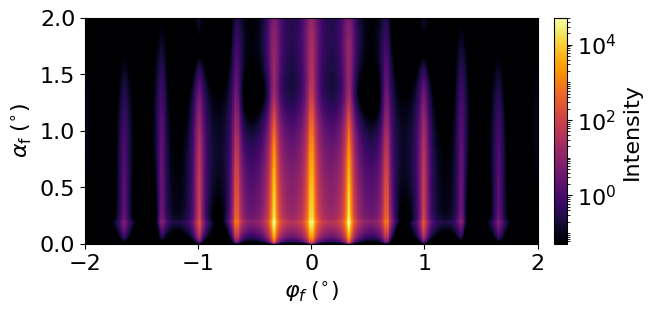
GISAS from hemispherical holes in a substrate
Open the Holes lattice example.
The following example demonstrates soft particles in a finite layer. The particle is translated before deposition so that the diffuse sphere is placed inside the film.
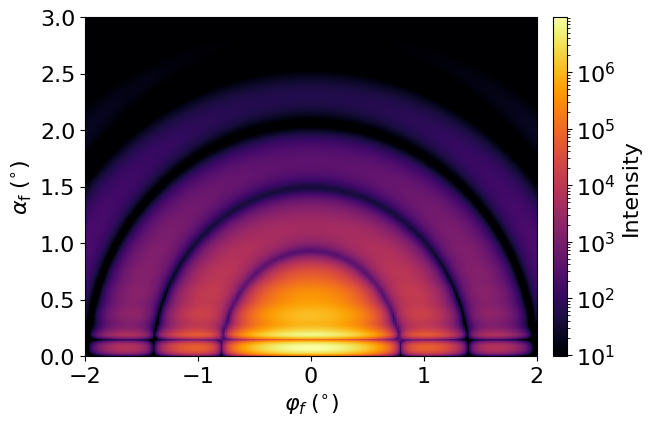
GISAS from soft spheres at a substrate interface
Open the Soft spheres example.
The deposit2D, suspend2D, fill3D, and add* methods were introduced in
BornAgain 24, replacing addLayout. The entire concept of a particle Layout
has become unnecessary and was removed.
